Landscape Layer Alpha Batch Reimports
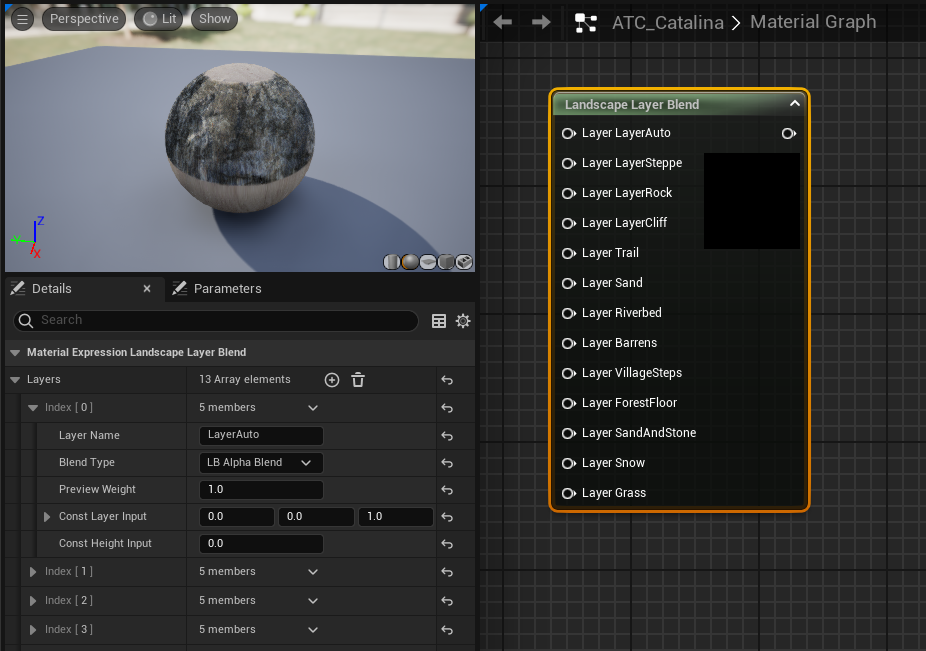
Landscape alpha layer batch reimport
Published on March 08, 2026 by Simsaladoo
sample post work notes
3 min READ
Random question, is it possible to edit Landscape paint layers in something like Photoshop and then batch reimport them into Unreal? This was a recent question I was looking to find an answer for and it led me into learning more about how Unreal creates them and how theyre stored. Typically you would use the SideFX Labs plugin to allow for Houdini to import the geo, textures, scattering, etc. but in some rare cases the landscape may be built from a weaker package that forces artists into different workflows.
Landscape Layer Editing
Layers are made using the Landscape Layer Blend node in the material graph. This node combines several material layers and determines how each layer appears on the terrain depending on alphas or weighted blends. These are great because you can apply different physical materials to each layer and build out different sound effects for footsteps, or changing movement/physics settings for loose soil or hard rocks. You can read more about their basic use-cases in the docs: https://dev.epicgames.com/documentation/en-us/unreal-engine/landscape-materials-in-unreal-engine
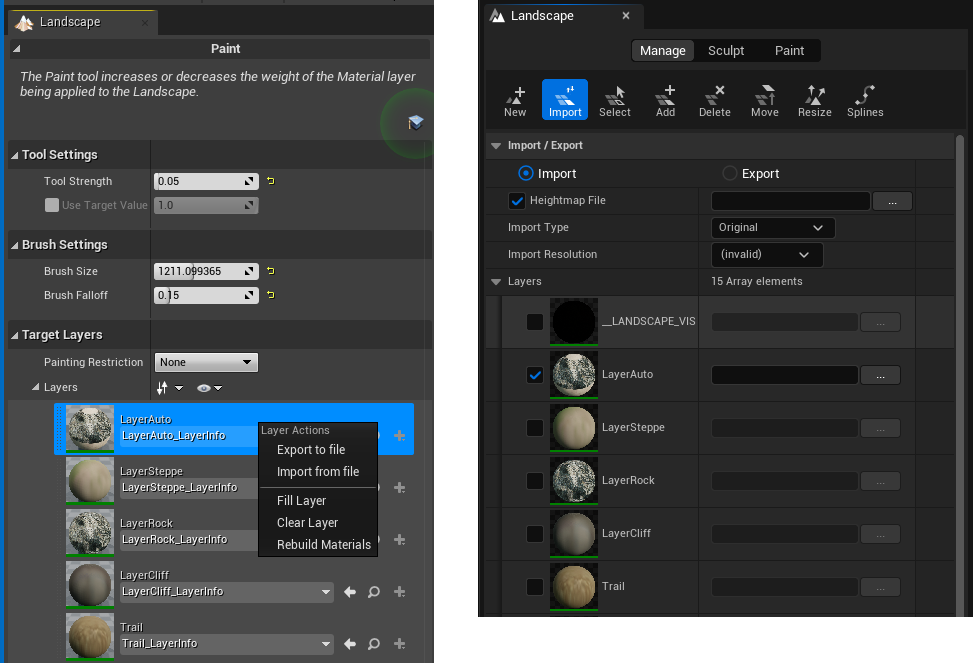
The manual way to export and import the layers is already built into Unreal’s UI and is pretty straightforward, the docs cover just about everything you’d need to know to get maps imported: https://dev.epicgames.com/community/learning/tutorials/KJ7l/unreal-engine-landscape-import-basics. The panel was very basic in UE4, but got some extra form controls with the switch to UE5:
This work well and all, but what if we wanted to automate it further and have all the layers import at once from a defined path? For this we need to access some deeper functions within the Landscape which aren’t exposed to python, so into source code we go.
LandscapeInfo.h and the LANDSCAPE_API
Within: “Engine\Source\Runtime\Landscape\Classes\LandscapeInfo.h” we can find the ULandscapeInfo UObject which is responsible for assigning FLandscapeInfoLayerSettings or “Layers” to the Landscape. Each of these Layers hold the Name, a debug color channel, and another object called the ULandscapeLayerInfoObject which holds values for hardness, physical material and other layer things we see in editor. The ULandscapeInfo can be read via the Landscape itself and using a pointer to GetLandscapeInfo() which returns its info. In here we can get the number of layers and their info objects and the resolution of the landscape extents.
So we know some of the basic classes we can access, but how do we actually import weighmap data into it? There isn’t a simple Import() function anywhere, so how does it work?
Accessing any of this data in the landscape requires the use of the low-level landscape editing API. It bypasses the editor tools and modifies the landscape’s data arrays directly. So to make changes, we have to use a editing interface to pass changes to it.
The class to use is the FLandscapeEditDataInterface, which is part of this API. This struct has methods like GetHeightMapData, SetHeightData, etc. that we can use to make changes to the weights and alpha data.
Now that we’ve found the function to use for updating the textures, its just a matter of passing in the parameters it requires for us to update the Landscape:
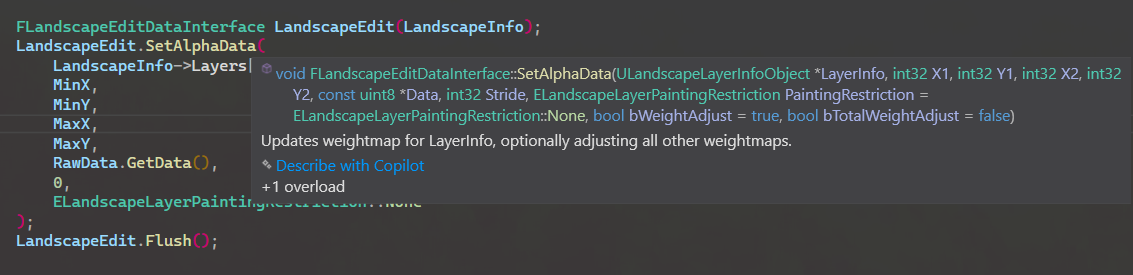
In my example I’m using SetAlphaData() to pass in a TArray
https://dev.epicgames.com/documentation/en-us/unreal-engine/landscape-technical-guide-in-unreal-engine
Naturally if you’re reading these kinds of editor classes you’ll need to make sure your plugin or source code is using the EditorOnly flags in the uplugin, the correct modules are added to PrivateDependencyModuleNames and wrapping the functions with “#if WITH_EDITOR” macros otherwise it won’t compile.
Once the function can find the correct imports and compiles, you can create a simple Editor Utility Blueprint to execute the function and all your layers can be reimported with a single click!